

Rental system for Second Life
Rentals that run themselves.
Rental meters that take payments in-world, one easy web dashboard for every unit and tenant, and reports that show exactly how your rentals are doing. Set it up once and get back to building.
Free to startNo limits on unitsL$1,650 once for no commission
How it works
Up and renting in three steps
No notecards to fill in and no scripts to edit. Everything is set on the web, and your boxes follow.
Rez a rental meter
Put one on each unit. Touch it and follow the link to make your free dashboard account.
Set it up on the web
Name, price and rental period, for one unit or hundreds at once, or set defaults so new boxes arrive ready. The meter updates by itself.
Tenants pay, LifeRental does the rest
Rentals start and renew, reminders go out, overdue units get handled, and every payment is recorded.
Dashboard
Easy to manage, from one unit to hundreds
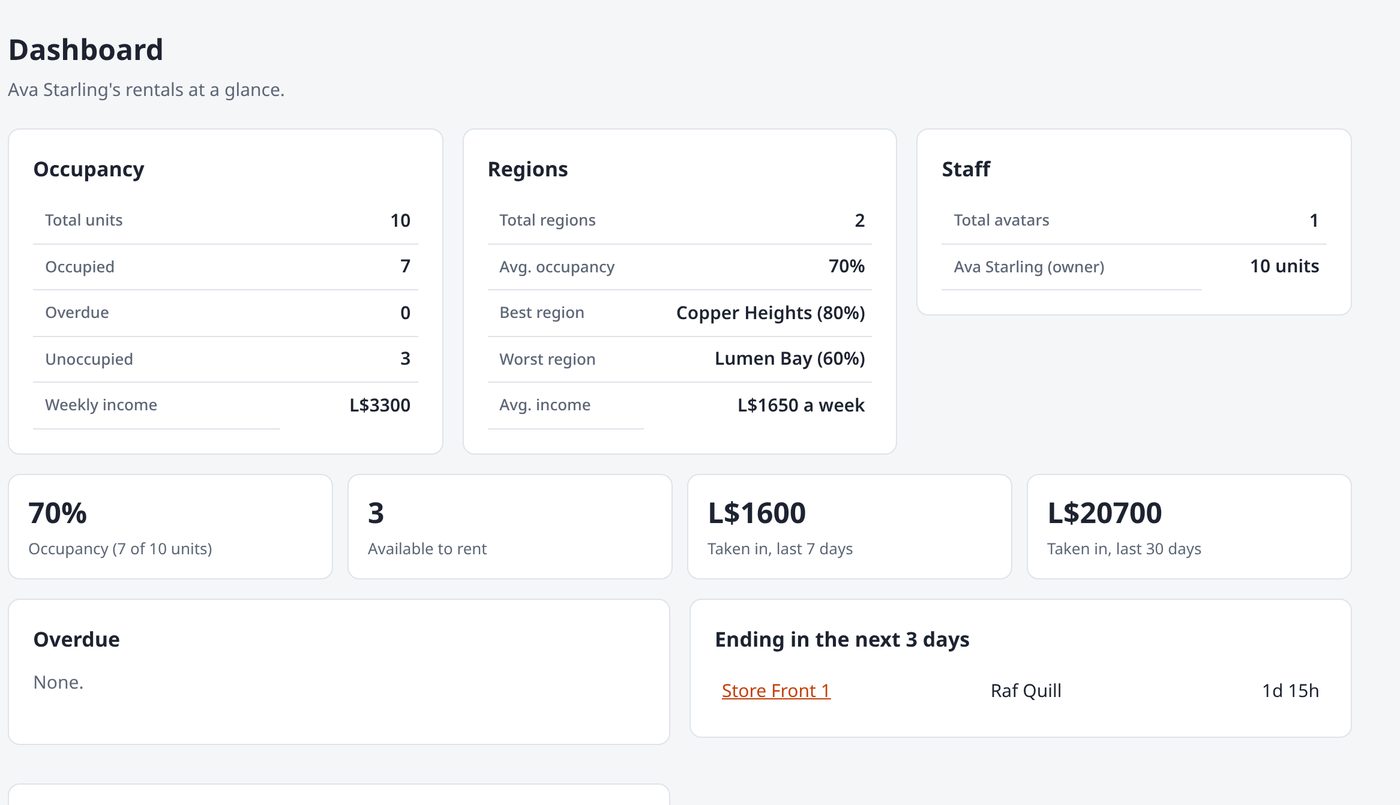
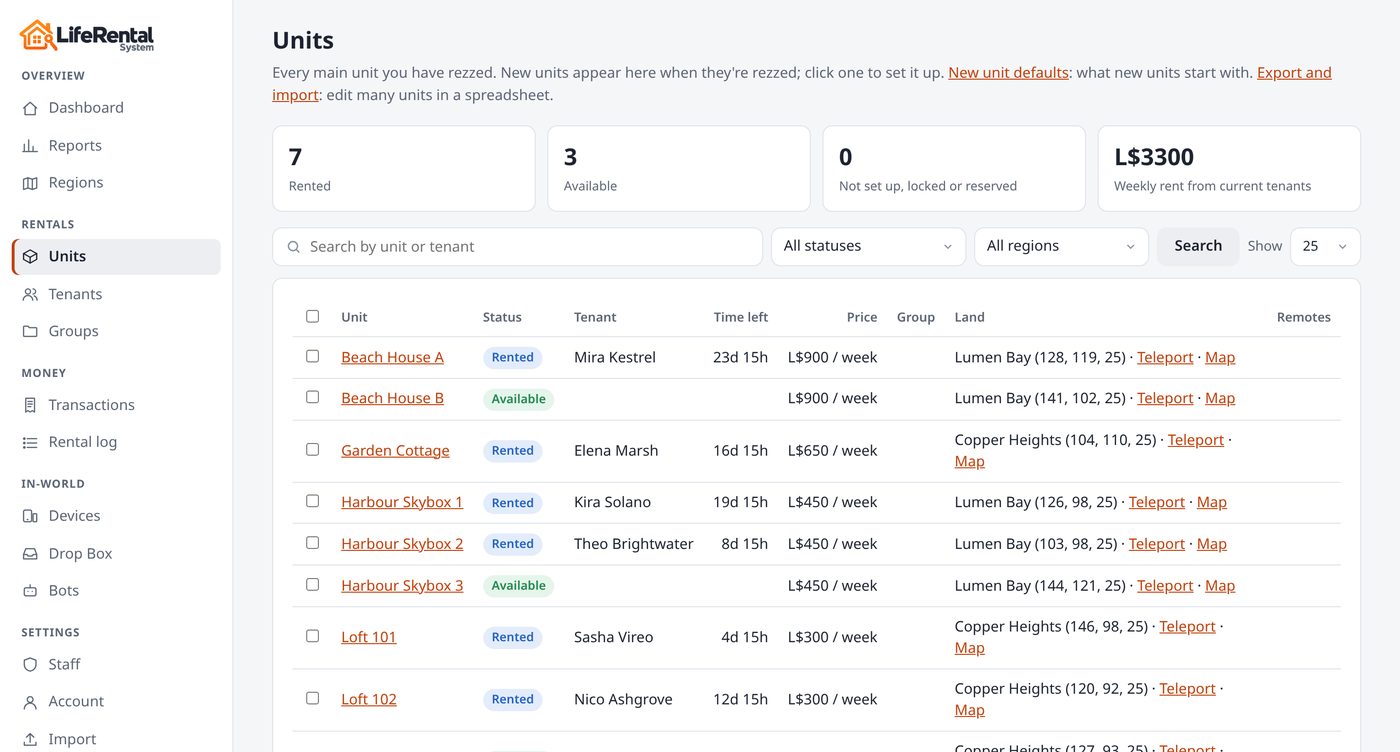
Every unit, tenant and payment in one place, across all your regions. Find any unit in seconds, change many at once, and let new boxes set themselves up.
- Search by unit or tenant, with filters for status, region and group
- Bulk edit: change only the settings you tick, leave the rest as they are
- Export to Excel or CSV, edit there, and import it back
- Defaults for new units, and boxes that name themselves Rental 01, 02, 03
- Combine a tenant's units into one rental, and split them again any time
- Light and dark mode, on any screen
Analytics
Know exactly how your rentals are doing
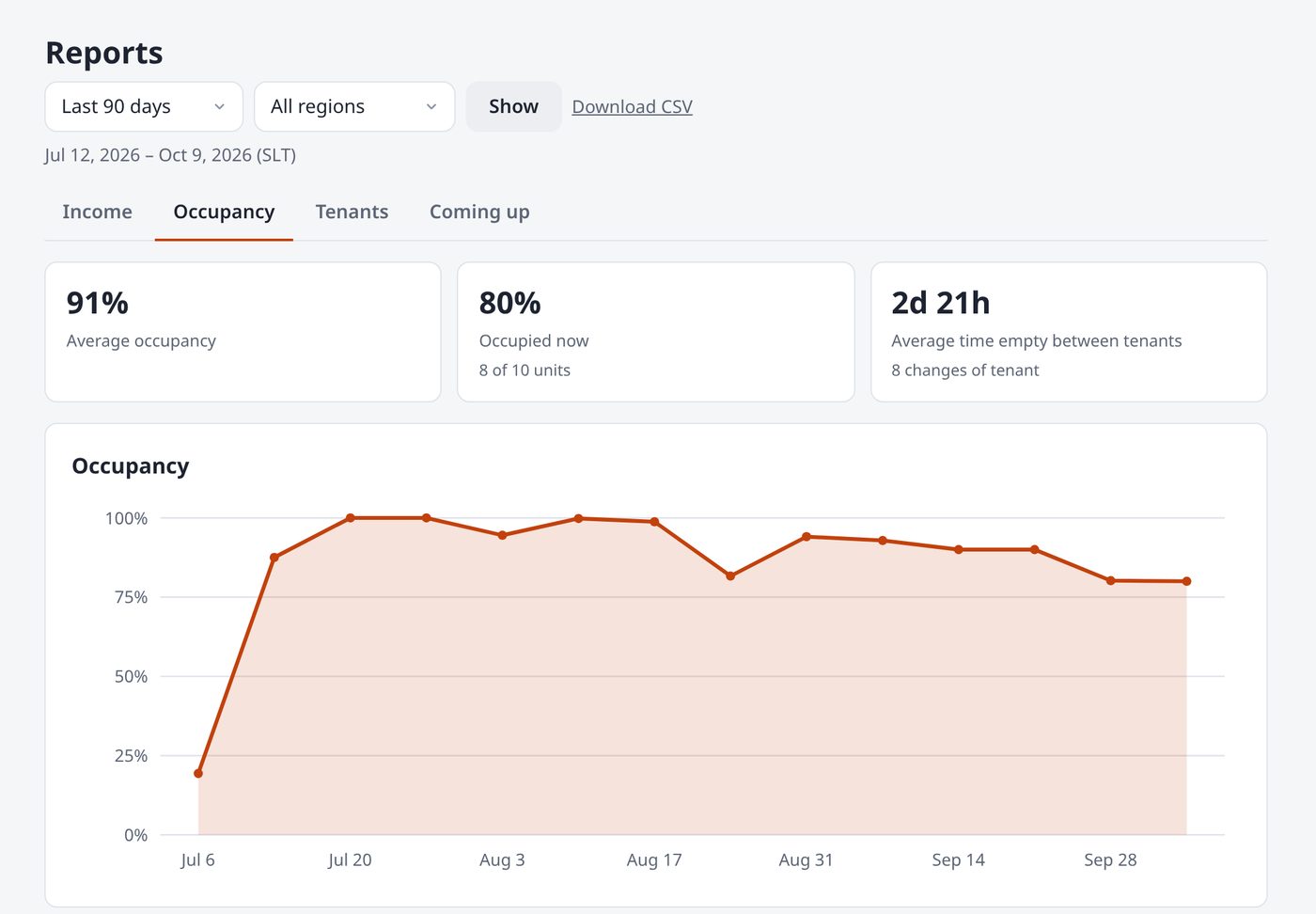
Reports turn every payment and every tenancy into clear charts. See what you earned, how full your units are, who's new and who renewed, and which rentals end soon, so you know where to put your effort.
- Income with the change from the period before, and your best and lowest earning units
- Occupancy over time, and how long units stay empty between tenants
- New tenants, renewals, renewal rate and your top tenants
- Coming up: overdue rent and the rent at stake in the next 7 and 30 days
- Today, yesterday, this week or month, any dates; per region or group; CSV download
In-world
A meter tenants understand
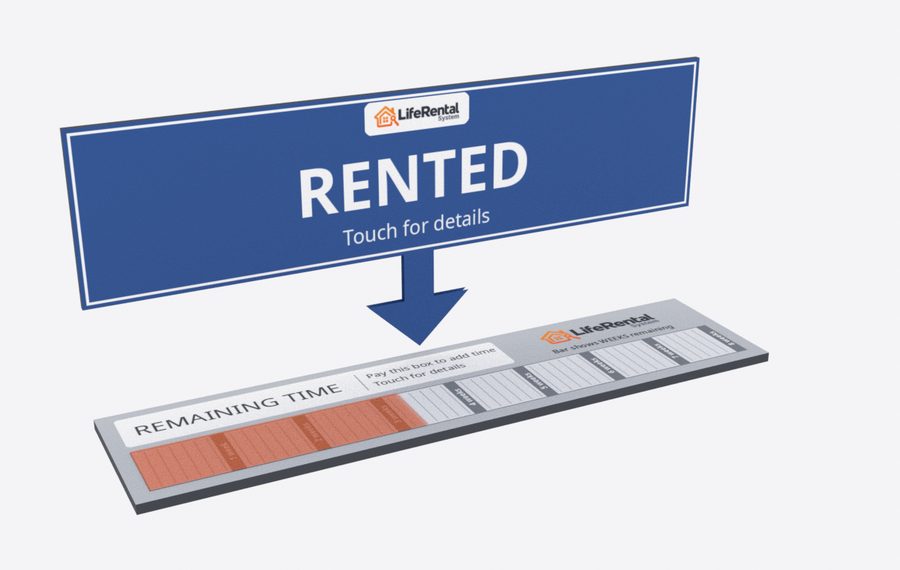
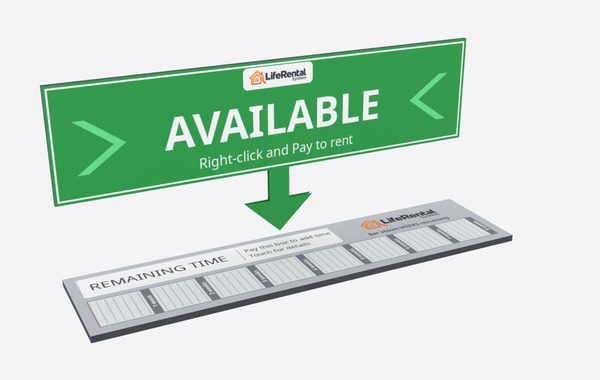
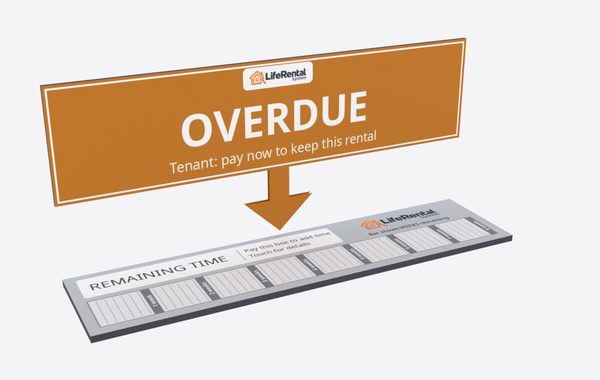
The sign shows whether a unit is available, rented or overdue. The bar below shows the time left and switches scale by itself, from minutes up to months. Tenants pay by right-click, and touch for everything else.
- Remotes anywhere on the grid
- Or use your own box, prim or mesh
- Swap in your own sign textures
Tenants
Fair to every tenant, automatically
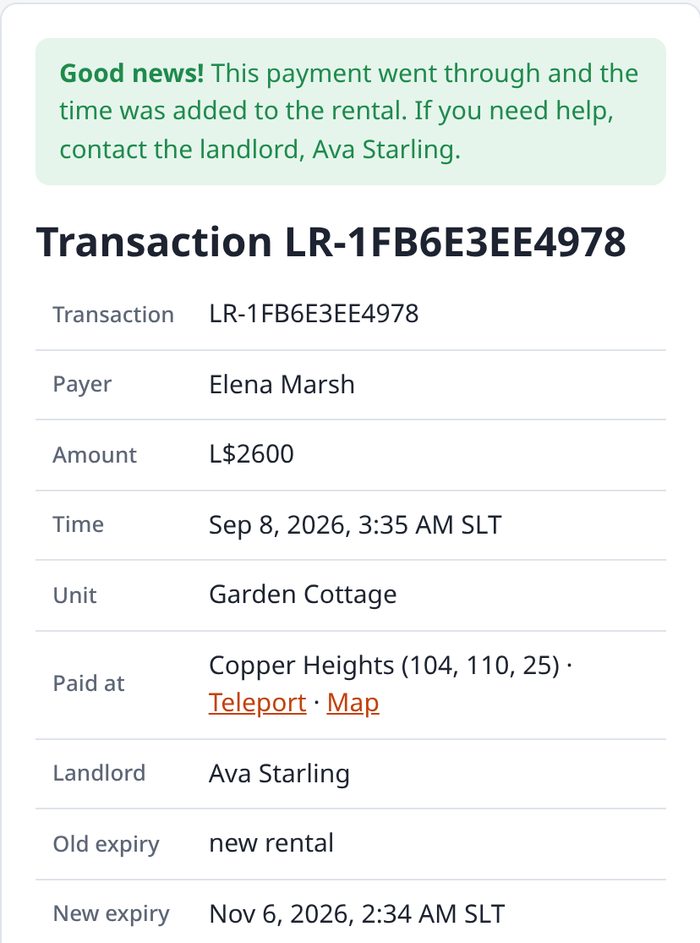
Each tenancy keeps a credit ledger, so a refund is always exactly the unused time. Every payment gets a receipt page tenants can open, showing what happened, step by step.
- Reminder IMs before a rental runs out
- Overdue notices and optional automatic eviction
- Discount levels and bonus time for longer rentals
Land impact
Keep every parcel in check
Rez one Prim Counter per region. It counts each tenant's land impact, shows it on their unit, and warns them and you when they go over their allowance.
- Allowances per unit, with extras
- Combined counts for tenants with several units
- Warnings in IMs and on the dashboard

Everything included
All the tools a landlord needs
Your boxes stay simple: they take payments and show who rents what. Everything else runs on the LifeRental server, so new features reach you without replacing a thing.
Rental meter
A status sign and a time-left bar that switches scale by itself, from minutes to months.
Remotes
Take payments for a unit from your store, landing point or vendor wall.
Your own build
Drop the script into any box, prim or mesh you like.
Flexible pricing
Per day, week or month, pay buttons, minimum and maximum rental times.
Reminders
IMs before a rental runs out and while it's overdue, and optional automatic eviction.
Fair refunds
A credit ledger per tenancy, so an eviction refunds exactly the unused time.
Nothing slips through
Any refund or payout a box couldn't send is listed for you to pay by hand, and the tenant's receipt says so.
Receipts
Every payment gets a reference and a page showing what happened, step by step.
Discounts and bonuses
Discount levels, bonus time and profit shares, paid out automatically.
Drop Box
One object hands out every notecard and landmark, and pays refunds.
Rental Vendor
One terminal where tenants pay for any of their rentals, see them, or browse what's free.
Prim Counter
Counts each tenant's land impact across the region and warns when they go over.
Group invites
Invite tenants to your group with the right role through LifeBots, and eject them when they leave.
Staff
Viewers, managers and admins, each with their own login and permissions.
Reports
Income, occupancy, tenants and what's coming up, as charts for any dates, region or group.
Find anything fast
Search by unit or tenant, and combine filters for status, region and group.
Excel and CSV
Export your units to a spreadsheet with dropdowns, edit them there, and import them back.
Defaults for new units
Set prices, reminders, discounts and more once. Every new box arrives ready, and names itself.
Combine units
A tenant renting several units pays for them as one rental: one price, one end time, payable at any of them.
Move tenants
Move a tenant to another unit with their time converted by price, or hand a rental to another avatar.
Your business name
Tenants see your rental business's name in every IM, menu and receipt.
Add-on · Life Security
Security your tenants control
A friendly robot that guards your land: it watches its areas, warns anyone who shouldn't be there and removes them if they don't leave. Link one to a rental, and that tenant arms it, disarms it and chooses their guests while they rent; it changes hands by itself when the rental does.
- Areas on a map, each with its own rules; tenants see theirs too
- A live map of who's where, while you have it open
- Access lists, lockdown, visitor tracking, and keeping bots out
- In your LifeRental dashboard, under Security

Switching
Already renting with another system?
Move over without losing a tenant or a minute of their paid time.
- Rez the Migrator in a region and touch it.
- It finds your existing units and places a LifeRental box beside each one, with the same name, price and prim allowance.
- Choose to move the tenants with their remaining time, and lock the old units.
- Check everything on your dashboard, then take the old units down when you're ready.
Pricing
Simple pricing, every feature in every plan
Start free and upgrade whenever you like. Your units, tenants and settings stay exactly as they are.
Demo
Try the real system on your own land first.
For 8 hours
- A working rental meter and remote
- Your own dashboard
- Only you can rent it; it deletes itself afterwards
Free
For landlords starting out, or who'd rather not pay up front.
+ 2% of each tenant payment
- Every feature, no limits on units
- The 2% is paid automatically by your box
- Boxes need debit permission
- Copy and transfer
Lifetime
For landlords who want to keep every Linden.
Introductory price. No commission, ever
- Every feature, no limits on units
- Every future update included
- One box upgrades your whole account
- No debit permission needed
Taking more than L$82,500 in rent over time? Then Lifetime costs less than the Free plan's commission would. Or buy it in-world at the LifeTech Store in Second Life.
Is the Free plan really free?
Yes. There's nothing to pay up front and no limit on units. Instead, 2% of each payment your tenants make goes to LifeRental, paid automatically by the rental box that took it. Payments you make to your own units are never charged.
Why do Free boxes need debit permission?
So the box can pay the 2% commission (and refunds, discounts and profit shares) by itself. The box asks for it when you rez it. Without it, a Free box doesn't take payments, and its sign tells you how to fix that.
Can I upgrade from Free to Lifetime later?
Any time. Rez any box from the Lifetime pack and your whole account upgrades: your Free boxes keep working and stop paying commission, and your units, tenants and settings stay exactly as they are.
Is there a limit on units, regions or tenants?
No. Both plans have every feature with no limits. Rent out one skybox or a whole estate.
I already use another rental system. Do I lose my tenants?
No. Rez the LifeRental Migrator in a region and touch it. It finds your existing rental units, places a LifeRental box beside each one with the same name, price and prim allowance, and can move each tenant over with their remaining time.
Can I use my own rental box design?
Yes. The rental meter is ready to use, but you can also drop the script into any box, prim or mesh of your own, and replace the sign textures with your own.
Can I see how my rental business is doing?
Yes. Reports shows your income, occupancy, new tenants and renewals, and the rentals ending soon, as charts for today, yesterday, this week, this month, the last 90 days, this year or any dates you choose. Narrow them to one region or group, and download any report as CSV.
I manage hundreds of units. Is that easy?
Yes. Search and filter your units, change many at once with bulk edit (only the settings you tick change), or export them all to Excel, edit them there and import them back. Defaults mean every new box you rez is already set up, and named Rental 01, 02, 03 and so on.
A tenant rents several of my units. Can they pay once for all of them?
Yes. Combine their units into one rental: one price (the prices added up, or one you set), one end time, and a payment at any of the units or their remotes extends them all. The time they've already paid for is combined by what it's worth, so nothing is lost or gained. Split a unit off, or undo it, whenever you like.
What if a refund can't be sent?
A rental box needs debit permission to send money back, and even then Second Life can turn a payment down (say your L$ balance is too low). LifeRental tries your Drop Boxes and the unit's box, and anything none of them could send is listed on your dashboard for you to pay by hand, with one click to mark it paid. The tenant's receipt tells them a refund is on its way, so nothing is forgotten.
Can my managers help run my rentals?
Yes. Add staff as viewers, managers or admins. Each gets their own login, and only sees and changes what their role allows.
Is there security for my rentals?
Yes: Life Security, our add-on (L$1,899 once). Link its orb to a rental and the tenant controls the security for their place: arm, disarm and choose their guests, with areas, lockdown, visitor tracking and a live map of who's where. It uses the same account, and its pages are in your dashboard under Security.
Can I try it first?
Yes. The free demo is the real system for 8 hours: a working rental meter, a demo remote and your own dashboard. Only you can rent the demo, and it deletes itself afterwards.
Spend less time collecting rent
Rez a meter, set a price, and let LifeRental handle payments, reminders and refunds, while your reports show how it's all going.